

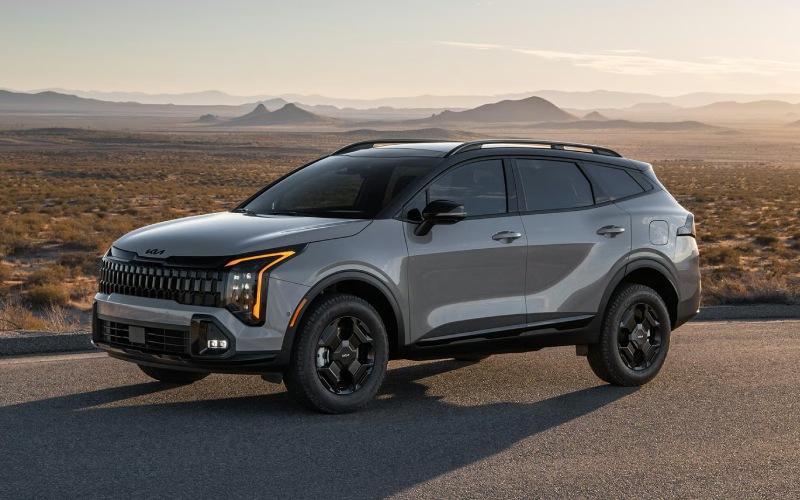
Matt Blatt Kia of Toms River – Does the 2026 Kia Sportage have wireless Apple CarPlay® and Android Auto™ near Lakewood, NJ?
Seamless smartphone connection matters when you drive every day between Lakewood and Toms River, and the 2026 Kia Sportage makes it easy. Yes — the 2026 Sportage supports Wireless Apple CarPlay® and Wireless Android Auto™, so you can leave the cords at home and bring your favorite apps, maps, music, and messages onto the Sportage’s display with a quick, cable-free setup.
From the standard 12.3-in. Touchscreen Display to the available Dual Panoramic Display with approximately 24 in. of combined screen real estate, Sportage is designed to keep your digital life front and center while you keep your eyes on Route 9 or the Garden State Parkway. Pair that with available voice control, a refined interface, and thoughtful touches like available Qi-enabled wireless smartphone charging, and you get a daily drive that feels simple and connected.
Why wireless integration matters around Lakewood
Whether your routine takes you down Route 70, over to Brick Boulevard, or to errands along Cedarbridge Avenue, going wireless streamlines every trip. Here’s how it shows up in real life:
- Cable-free convenience: Start the car, and your iPhone or Android device connects automatically — no plugging in when you’re hopping between stops in Lakewood Town Square.
- Faster setup: First-time pairing takes just a minute. After that, CarPlay® or Android Auto™ loads as you shift into drive, ready with your last playlist or podcast.
- Cleaner cabin: Less clutter in the console means more usable space for keys, toll transponders, and cups — especially helpful when sharing the Sportage with family.
- Voice-first control: Ask Siri or Google Assistant for directions, send a text, or change playlists — all while keeping your hands on the wheel and eyes ahead.
- Better audio integration: Calls and navigation prompts balance naturally with your music. Add the available Harman Kardon® Premium Audio for rich, immersive sound.
- Ongoing improvements: With available Over-the-Air Updates, the Sportage can update infotainment software automatically, helping your system stay current.
All of it adds up to a calmer commute and fewer distractions — the kind of everyday upgrade you notice most in tight traffic and busy parking lots around Lakewood and Toms River.
How it fits into the 2026 Sportage tech suite
Wireless Apple CarPlay® and Wireless Android Auto™ are standard across the 2026 Kia Sportage lineup, and they work hand in hand with the SUV’s modern interface. The standard 12.3-in. Touchscreen Display gives you bright, responsive control of apps. The available Dual Panoramic Display expands your view to approximately 24 in. of combined screens, placing driving info and multimedia side by side.
Sportage is more than mirroring — it’s a connected hub. Available features like 360° Surround View Monitor, Blind-Spot View Monitor, and Highway Driving Assist help support confident driving in certain situations, especially on the Parkway or in dense traffic where awareness is everything. Wireless smartphone integration simply complements those systems by making the apps you rely on as accessible as possible.
Quick setup guide: Wireless Apple CarPlay® and Android Auto™
You can pair your phone in a few minutes and be on your way. Here’s the straightforward process we walk through with customers at Matt Blatt Kia of Toms River:
- Start the Sportage and enable Bluetooth on your phone.
- On the Sportage touchscreen, open the device connection menu and select Add New Device.
- Confirm the pairing code shown on both the touchscreen and your phone.
- On your phone, accept prompts to enable Apple CarPlay® or Android Auto™ wirelessly.
- Allow access to contacts and messages if you want hands-free calling and texting.
- Choose whether CarPlay®/Android Auto™ should launch automatically when you start the vehicle.
- Optional: Add your phone to the driver profile so your settings load with your key.
From there, you can customize your home cards, app order, and voice assistant settings. Many of our local drivers appreciate setting a default navigation app and favorite audio app so the same experience is ready every time they set off.
How Lakewood drivers put it to work
Commutes and errands vary, but a few use cases come up again and again when we help shoppers from Lakewood, Jackson, and Brick set up their Sportage. If you’re heading north along Route 9, ask Siri or Google Assistant to route around congestion, and your chosen app will factor in traffic automatically. If your day starts at Lakewood Industrial Park or Monmouth Medical Center Southern Campus, you can send your destination to the car before you leave, then hop in and go — no cables to plug in at the curb.
On weekends, navigation to Island Beach State Park or the Seaside Park boardwalk is effortless. Beach parking can get busy, and available Find My Car in the Kia Access app helps you relocate your Sportage quickly. If you park near ShoreTown Ballpark for a game, that same tool helps you walk right back to your spot after the ninth inning.
For tight downtown parking or crowded shopping centers, the available 360° Surround View Monitor can assist with maneuvering in certain situations. With your phone stowed and CarPlay®/Android Auto™ running wirelessly, you keep both hands free to steer while the camera system provides an aerial-style view on the display.
Power and charging tips for all-day use
Wireless projection is designed for convenience, and the 2026 Sportage backs it up with available Qi-enabled wireless smartphone charging. If you’re using navigation and streaming for hours, that pad helps maintain battery charge without plugging in. You’ll also find USB ports on board if you prefer a wired top-off during longer drives.
- Keep your case thin: Thick or metal-backed cases can limit wireless charging efficiency. A slim case improves charging consistency.
- Use one connection at a time: For the smoothest experience, choose either wireless or wired — not both simultaneously.
- Update software: Ensure your phone OS and the Sportage infotainment software are current for best compatibility.
- Restart if needed: After big app or OS updates, a quick phone restart can resolve minor connection quirks.
- Center the phone: Placement matters on a wireless pad — align the phone over the charging symbol for reliable power.
Frequently Asked Questions:
Will multiple drivers be able to use wireless CarPlay® or Android Auto™ easily?
Yes. You can pair multiple phones and set a priority device. The Sportage will attempt to reconnect to the last active device first. You can also switch sources from the touchscreen in a couple of taps.
Does Wireless Apple CarPlay® or Wireless Android Auto™ work if my phone battery is low?
It will connect if the phone still has power. To prevent battery drain on longer trips, place your device on the available Qi-enabled wireless smartphone charging pad or plug into a USB port for faster charging.
Can I run Apple Maps or Google Maps and still see key vehicle info on screen?
Absolutely. With the available Dual Panoramic Display, navigation can occupy part of the screen while the driver display shows speed, driver-assist status, and other driving information side by side.
What if my connection drops occasionally?
Check for software updates on both your phone and the vehicle. Also, remove and re-add the device in the Sportage Bluetooth settings to refresh permissions. If you use a charging pad, make sure the phone is positioned correctly, and the case is not interfering.
Do steering-wheel controls and voice assistants still work with wireless projection?
Yes. You can use the steering-wheel buttons to answer calls, adjust volume, and trigger voice assistants. Siri or Google Assistant will respond through the vehicle’s microphone and play audio through the Sportage speakers.
Beyond mirroring: integrated features you’ll appreciate
Wireless CarPlay® and Android Auto™ are only part of the 2026 Sportage story. Available Remote Start & Climate Control lets you prep the cabin before heading out. Available Digital Key 2.0 can let you use your compatible smartphone to unlock and start the vehicle. Kia myQ Connected Garage can allow you to control and even automate your garage door from the Sportage’s touchscreen. And with available Over-the-Air Updates, the vehicle can enhance infotainment features automatically.
Driver confidence is supported by standard and available advanced driver-assistance features. Technologies like Auto Emergency Braking w/ Junction Turning Detection, Blind-Spot Collision-Avoidance Assist, Rear Cross-Traffic Collision-Avoidance Assist, and Highway Driving Assist help support safer, more relaxed trips in certain situations — from merging onto the Parkway to navigating crowded lots near big-box stores on Route 70.
If you want to experience how the interface, displays, and audio system work together, we’re happy to set up a personalized tech demo at Matt Blatt Kia of Toms River. We’ll pair your phone, customize settings, and show you how to get the most out of your daily drive.
See wireless CarPlay® and Android Auto™ in action
Ready to try it yourself? Visit us at 1070 Rte 37 W in Toms River — just a quick drive from Lakewood — and take a 2026 Kia Sportage for a spin. We’ll walk you through setup, demonstrate available features like the Dual Panoramic Display, 360° Surround View Monitor, and Harman Kardon® Premium Audio, and answer any questions about living with the Sportage day to day.
As a multi-time recipient of Kia’s President’s Club Award, our team is committed to straightforward guidance and a great experience. Bring your current vehicle for an on-the-spot cash offer, explore our massive selection, and drive with confidence backed by Kia’s industry-leading 10-year/100,000-mile Limited Warranty. If you want extra peace of mind, our 4-Day Return Policy helps make your decision even easier. Stop in, or reach out to schedule your test drive and connected tech demo today.
Request more 2026 Kia Sportage information
Connect with us


Recent Blog Entries
- Inside the 2026 Kia K4 — Dual Panoramic Displays and Smart Safety for Bayville, NJ Commuters
- How Terrain Mode on the 2026 Kia Sorento Hybrid fits daily life around Forked River, NJ
- How Passenger View with Night Vision in the 2026 Kia Carnival MPV fits life around Point Pleasant Beach, NJ
- Confident AWD and Smart Tech in the 2026 Kia Sportage Hybrid for Point Pleasant Beach, NJ Drivers
- The 2026 Kia Sportage tech that simplifies daily driving around Point Pleasant Beach, NJ
Categories
 Warranties include 10-year/100,000-mile powertrain and 5-year/60,000-mile basic. All warranties and roadside assistance are limited. See retailer for warranty details.